Most organisations we work with have an AI use policy by now. It usually says the right things: a person reviews AI output, nothing goes out unchecked, sensitive data stays out of public tools.
Then a deadline arrives. The reviewer is in a meeting, the post has to go today, and the policy is a document nobody opens.
The problem
A policy depends on every person remembering it at the moment it matters. That works when people have time. Content teams rarely do. The steps that get skipped first are the ones that slow things down, and review is the step that slows things down most.
The answer is to move as many rules as possible out of the document and into the tools, so that following them is the only way to get the work done.
Five gates, built into our publishing system
Our blog is published through a content management system Partha built. AI is allowed to help at several points. At each point, the software decides what AI may and may not do.
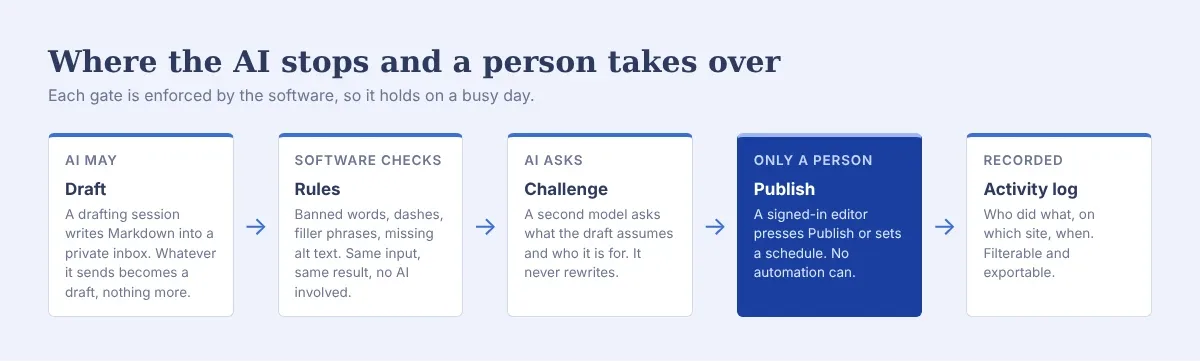
1. AI may draft, and that is all
An AI drafting session can send posts to the system through a private inbox. Everything that arrives that way is saved as a draft, regardless of what the file asks for. There is no setting, flag or key that lets an automated process publish.
The design choice that matters: the restriction lives in the system that receives the work. An AI can be told to "only create drafts" and still get it wrong. A system that cannot publish from that path cannot be talked into it.
2. The rules check is plain software
Every draft is checked against a fixed set of writing rules: a list of banned words, no em dashes, no filler transitions, no rhetorical reframes, alt text on every image.
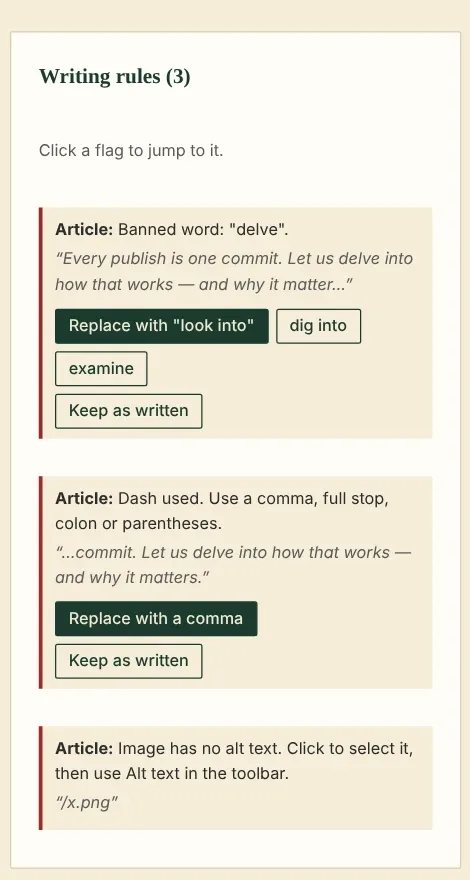
This check uses no AI at all. The same text always gives the same result, so the rules apply the same way whether a person or a model wrote the draft. Each flag offers a fix and a "keep as written" option. The writer still makes the call.
Most teams have a style guide. Few have one that checks itself. If your rules can be written as a list, they can be written as a check.
3. A second model asks questions and leaves the writing alone
A separate AI model reads each draft and asks the questions a sharp editor would ask: what is this assuming, who is it for, what can go.
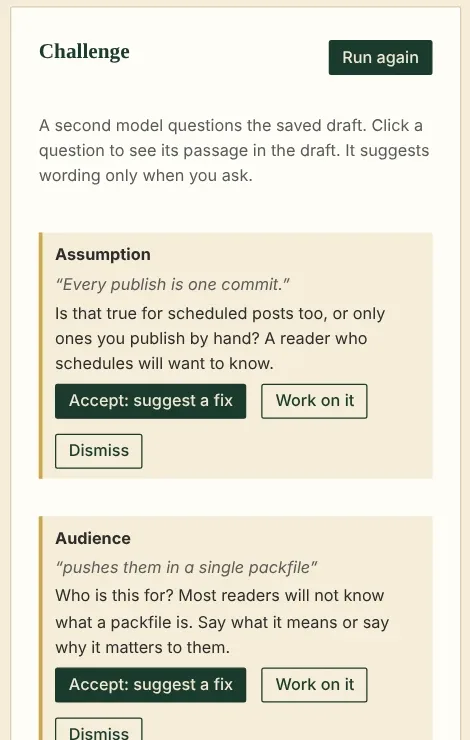
It is built to ask. It offers wording only when the writer asks for it. If it rewrote on its own, it would become a second author, and the writer's voice would drift towards the model's. Each question is pinned to a quote, and the writer decides what to do with it. The system also keeps a count of how often its questions lead to a change. If that number stays low, the step is not earning its place, and it can be switched off for that site.
4. Only a signed-in person publishes
Publishing, and scheduling a post for later, need a signed-in person with publishing rights. A schedule is an approval given ahead of time. The bulk tools move, archive and delete. None of them publishes. Each post goes live from its own page, after its checks.
5. Everything is recorded
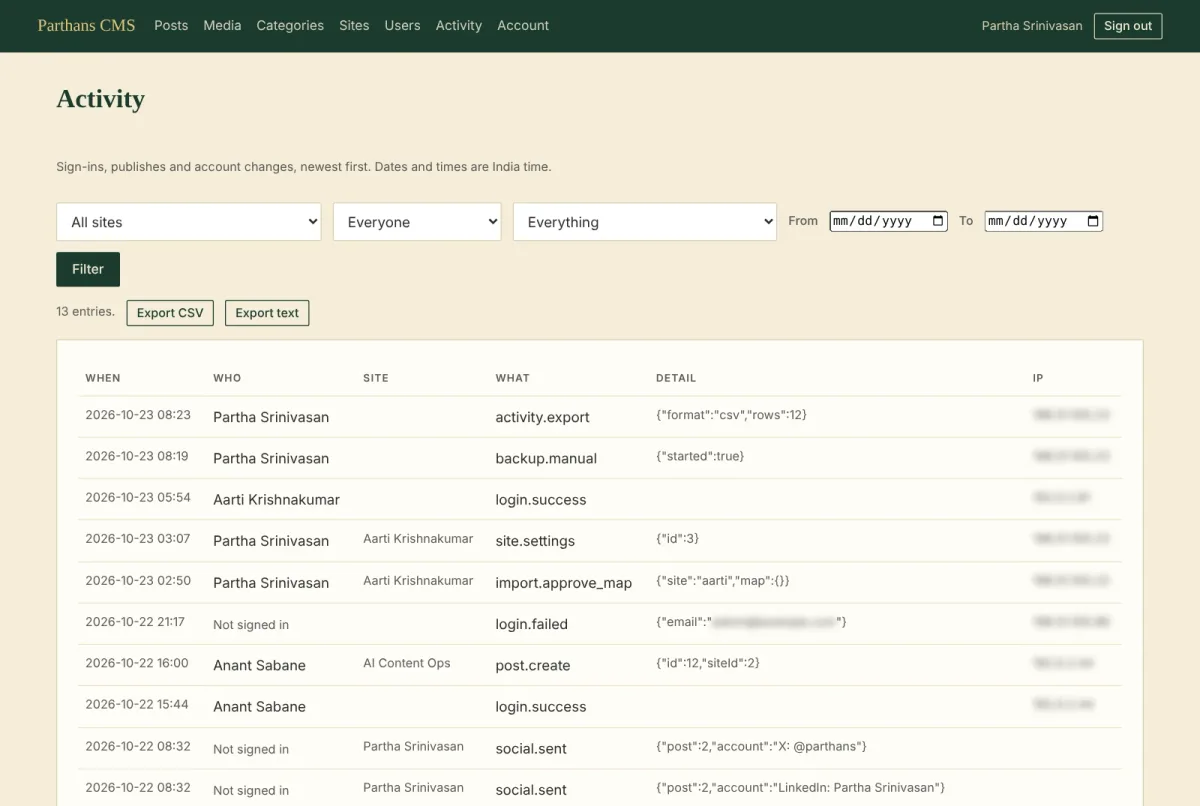
Every sign-in, publish, settings change and export goes into an activity log, filterable by site, person, kind of action and date, and exportable for anyone who needs to audit it.
What it cost
Very little. The rules check was a list of patterns. The draft-only inbox was a design decision made before any code existed. The audit log is a table that every action writes one line to.
The harder part was deciding where each line sits: what AI may do alone, what software checks, and what only a person may decide. Once those were written down, building them was the easy part.
Applying this to your own tools
You may not be building software. The same questions apply to any AI workflow your team uses.
What can the AI touch, and what can it change? If the answer is "anything the user can", narrow it.
Which of your rules could be checked mechanically? Banned claims, required disclaimers, brand terms, missing alt text. Each one you automate is one a tired reviewer cannot miss.
Where must a person decide? Make that step impossible to skip in the tool itself.
Can you show, later, who approved what? If not, an audit will be painful.
A policy says what should happen. The tools decide what can happen. Put the important rules where they cannot be skipped.