A year ago, a content team that wanted its own tool needed a developer. Now a manager with a clear idea and an AI coding assistant can have something working in days. Partha built the system that publishes this blog that way, working with Claude.
That raises a question we hear from clients more and more: if the person who owns the tool cannot read its code, how do they know it works?
The problem
AI-built software usually looks finished. The screens are tidy, the buttons work, and the explanations are confident. Review at the level of "does it look right" misses the failures that matter, because they sit in the cases nobody tried.
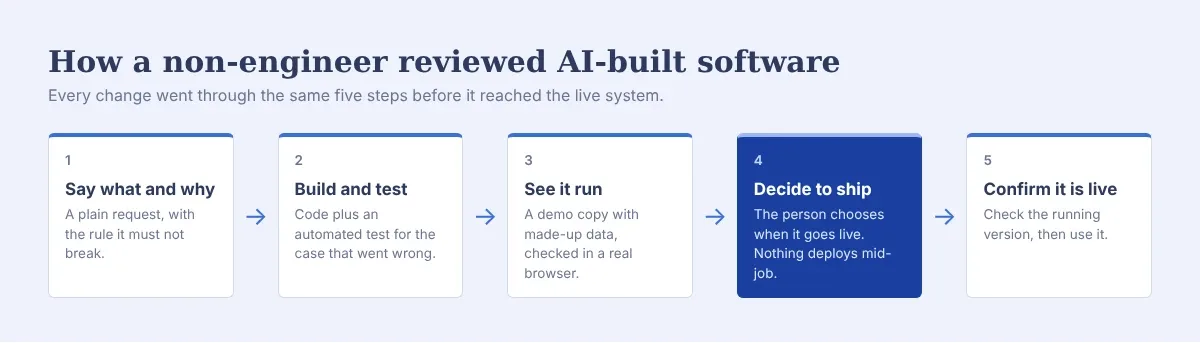
There are other ways to review it. These five habits need no code at all, and each one caught a real problem in our system.
1. Give the AI the facts it does not have
One evening, the import of a large old blog left 2,228 blank drafts in the system. Partha asked Claude why. The first answer was confident and reasonable: these were probably leftovers from an interrupted run, and deleting them in bulk would be safe.
Partha mentioned that the old site had over 2,400 posts. With that one fact, the explanation changed completely: the "blank drafts" were real posts, held in place until the import filled them in. Deleting them would have removed over 2,000 posts from the system. Running the import again would have recovered them, as long as the old site stayed online.
The AI had reasoned well from what it could see. It did not know what Partha knew. Before acting on an explanation, add what you know about the real world, and ask whether the explanation still holds. The most useful review question is often "what would have to be true for this to be right?"
2. Ask for a test with every fix
Every change to the system comes with an automated test that reproduces the problem and proves the fix. For the import, the test stops a run partway, makes the old site fail to answer twice, then runs it again and checks that nothing is lost and nothing is duplicated.
Ask two questions: is there a test for the thing that went wrong, and did it pass? A fix without a test is a fix nobody can check next month, when something else changes.
3. See it run, with data you can afford to lose
Visible changes are checked in a copy of the system that runs on made-up data. The screenshots in our posts come from it.
A running copy shows things a test does not. The first time it ran at a test address, it refused to save any changes, because the requests did not come from the address the system trusts.
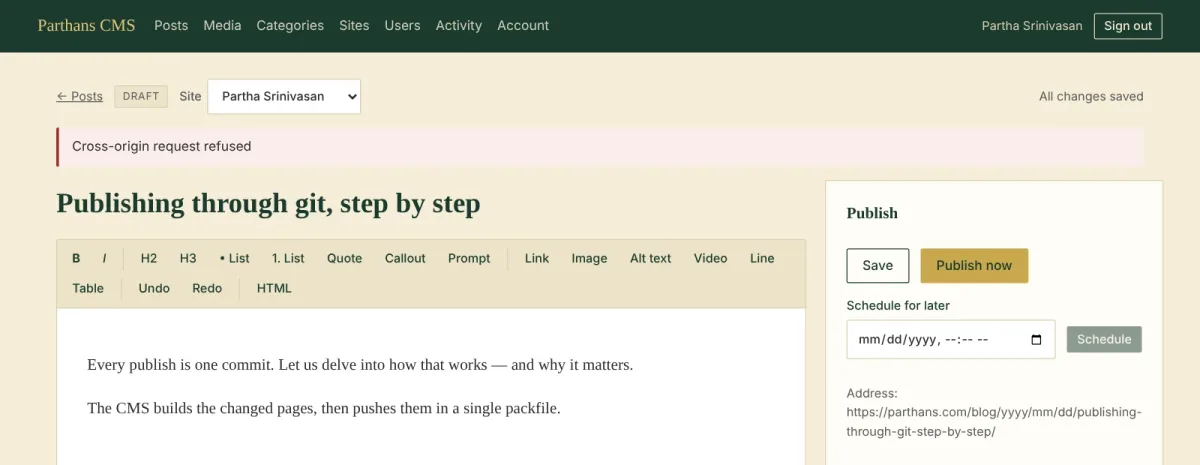
A refusal like that is reassuring. It means the protection holds even against the owner, when the conditions are wrong.
4. Decide when it ships, and protect work in progress
Every change to this system goes live by redeploying it, and a redeploy restarts it. That stops anything running at the time.
One night that stopped a long import partway through. The cause was mundane: a new version finished deploying ten minutes after the import started. The rule that came out of it is simple. Nothing goes live while a long job is running, and the AI asks before shipping whenever one might be. The person who owns the system decides when changes go live.
5. Confirm with evidence, including against your own theory
The morning after that interruption, Partha's first theory was that the nightly backup had crashed the system. It was a reasonable guess. Claude pointed out one clue against it, and gave him three commands to run on the server. The output settled it: the system had been replaced by a deploy at 10:55 pm, hours before the backup ran. The backup had failed too, for a separate reason, and that got its own fix.
Two lessons. Ask for evidence that can prove a theory wrong, including your own. And when the evidence points somewhere unexpected, follow it.
The same week, social posts for a new article sat waiting for hours. The first explanation, a queue of deploys, fitted the timing, and it was accepted without a check. What settled it was a change that made the system print, on screen, the reason it was waiting: the server could not connect to its own site. If a tool can be stuck, make it say why.
When the AI's own change is the problem
AI-built fixes can carry their own bugs. A progress screen added one morning kept pulling the user back to it after he had moved to another page. Partha noticed soon after it went live. Claude found the cause, fixed it, checked the fix in a test browser, and shipped it the same morning.
The review that caught it was the simplest one: using the thing for real, soon after it changed.
A worse one had been there from the first day. The step that tidies each post's HTML threw away any paragraph it thought was empty, and it counted a photo inside a link as empty. WordPress puts a photo inside a link whenever the photo opens its full-size file. Dozens of tests passed, because none of them contained that case. It came to light only when a new test, written with content taken from a real archive, failed for a reason nobody expected. Test with real content. Real archives contain the cases nobody thought to write down.
A checklist for owners who do not code
State each change with its reason and the rule it must not break.
Ask for a test for every bug, and confirm it passed.
Look at visible changes running, ideally on sample data.
Add the facts you know before accepting an explanation.
Choose when changes go live. Never mid-job.
Ask for evidence that could prove a theory wrong.
Use the change for real, soon.
None of these need you to read code. Together they catch what code review alone would miss: an explanation that sounded right and was missing one fact.